# How to Link the Wallet to HyperAGI？

#### Visit <https://www.hyperagi.network/>, select the blockchain you are using,then click'Connect Wallet'.  <a href="#visit-https-www.hyperdust.io-the-wallet-link-authorization-will-be-triggered-automatically.-choose-c" id="visit-https-www.hyperdust.io-the-wallet-link-authorization-will-be-triggered-automatically.-choose-c"></a>

#### &#x20;<a href="#visit-https-www.hyperdust.io-the-wallet-link-authorization-will-be-triggered-automatically.-choose-c" id="visit-https-www.hyperdust.io-the-wallet-link-authorization-will-be-triggered-automatically.-choose-c"></a>

<figure><img src="https://3015956148-files.gitbook.io/~/files/v0/b/gitbook-x-prod.appspot.com/o/spaces%2FhCc2UzBs6Y0gaVTgOls1%2Fuploads%2FFbD1JBZ0yEHEctnfjhD0%2F4.png?alt=media&#x26;token=b7faf998-deed-4056-b2bd-5eba66452c06" alt=""><figcaption></figcaption></figure>

#### Choose your wallet,and confirm wallet connection . <a href="#visit-https-www.hyperdust.io-the-wallet-link-authorization-will-be-triggered-automatically.-choose-c" id="visit-https-www.hyperdust.io-the-wallet-link-authorization-will-be-triggered-automatically.-choose-c"></a>

<figure><img src="https://3015956148-files.gitbook.io/~/files/v0/b/gitbook-x-prod.appspot.com/o/spaces%2FhCc2UzBs6Y0gaVTgOls1%2Fuploads%2FgmA1wvGapAlHOv6Op5vV%2F7.png?alt=media&#x26;token=2c145920-2cdd-4f7c-a013-46157d79eca1" alt=""><figcaption></figcaption></figure>

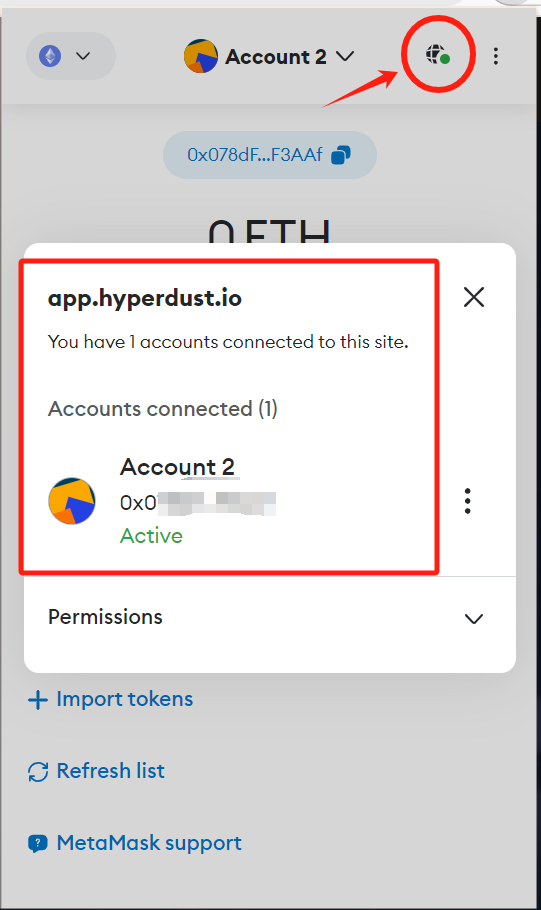
#### Click to view and ensure the link is successful. <a href="#click-to-view-and-ensure-the-link-is-successful" id="click-to-view-and-ensure-the-link-is-successful"></a>

<figure><img src="https://3015956148-files.gitbook.io/~/files/v0/b/gitbook-x-prod.appspot.com/o/spaces%2FhCc2UzBs6Y0gaVTgOls1%2Fuploads%2FVIb0KffJOR2QKyTRIMQg%2F03.png?alt=media&#x26;token=17d2049f-2ceb-4ebc-8e5e-f62277e624ee" alt="" width="406"><figcaption></figcaption></figure>

​